
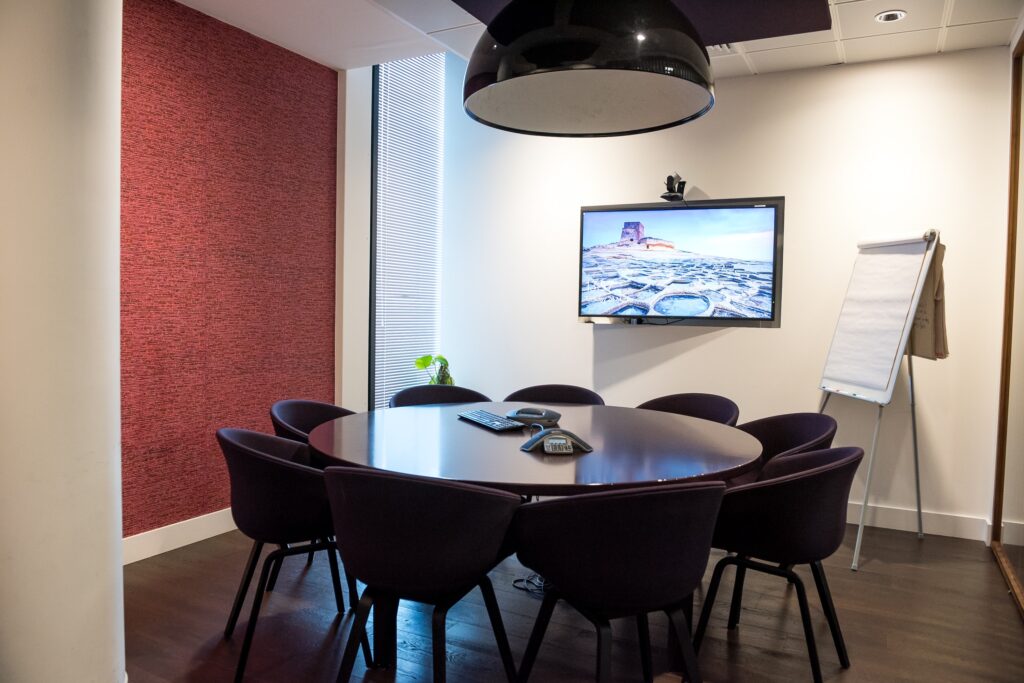
Video Conference Rooms
Unnecessary meetings, as we all know, are the worst part of any workday. However, for those meetings that must take place, having them in a Video Conference room that is well designed and equipped with the necessary tools can make all the difference in getting things done.
What are the differences between conference Huddle rooms, Meeting rooms, and Boardrooms?
At New Dawn Audio visual, we use the word Meeting Room to refer to places where meetings take place, but the terms conference room and meeting room are used interchangeably throughout the rest of the world.
Even though the function of having a room where people meet is fundamentally the same, we differentiate these venues when categorizing project images by their size and formality:
Huddle Room : A meeting room that seats six or fewer people.
Large Meeting Room: Meeting rooms that seat 7 or more people
Boardroom : A more formal meeting space reserved for executives.
Here are some ideas and thoughts.
Equipment for Meeting Rooms
The tools and equipment offered may make a Video Conference room either a delight to use or an awful nightmare waiting to happen.
Seating, worktables, collaboration equipment, acoustics, audio and privacy are the fundamental categories. However, precise specifications vary greatly depending on the demands of the business.
Seating
For longer sessions, more comfortable and ergonomic seating may be required. Some firms prefer to conduct stand-up meetings to help guarantee brevity, thus shorter sessions may not even require chairs.
Make certain that your Video Conference room can accommodate the number of individuals that will need to utilize it at the same time.
You may also add bench seats around the Video conference room’s perimeter to accommodate as many guests as possible.
Work Surfaces:
While most jobs necessitate the use of a table, smaller laptop tables or a lectern for presentation-heavy meeting rooms are viable alternatives.
Video Conferencing Collaborative Equipment.
Your Video Conferencing room A/V setup must be current and simple to use. It requires acceptable network rates that enable the latest video resolutions so that glitches do not interrupt your presentations. Room displays, projectors, and writing surfaces must be installed so that they are simple to maintain and repair, increasing the life of your purchase. Choosing a Video Conferencing Room.
Choose a meeting place with as few reflected surfaces as possible, especially outdoor windows and other big glass surfaces.
The capacity to alter lighting, room colour, background factors, furniture, and room size/shape should also be considered while choosing a meeting space.
Tip: It should be noted that some surfaces that look matte to the naked eye might cause glare observed by distant users that is not apparent in the actual location.
Privacy and acoustic
Background Noise
One of the major drawbacks of video conferencing is background noise. On the other end of the line, the rustling of papers, clicking of pens, and even sound leakage from other conference rooms might be picked up and create displeasure to those listening in.
To address this, microphones that are designed to take up just intended sounds while rejecting undesirable ambient noises such as fans, computers, pen clicking, and noises from nearby rooms are available.
A good acoustic treatment can also help with noise problems in a conference room. Sound masking is an excellent technique to reduce background noise and leaks from adjacent rooms.
Cross Talk
Sound masking is an excellent technique to reduce background noise and leaks from adjacent rooms. Sound masking has a frequency adjusted to mimic that of a human voice, allowing it to ‘mask’ any human speech. In a conferencing room, a good acoustic treatment can also help with noise problems.
It is not necessarily the technology that degrades the audio quality, but sometimes the people themselves. Establishing a meeting etiquette for employees to follow is an excellent method to prevent people from talking over each other and contaminating the audio on the other end of the line.
Although simple, rules like not interrupting other speakers, not having side conversations, and speaking directly into the microphone can have a significant impact on the call’s quality.
Microphones
During video conferencing, microphones can reduce background noise and improve audio quality. Ceiling microphone arrays with beamforming and steer ability are equally as effective as table microphones. Microphone positioning ensures crisp and clear sound is also ensured by good microphone positioning. There are many different microphones on the market; the size of the room and the demands of the company will determine which bespoke solution you choose.
Tip: Audio issues can completely negate the benefits of video conferencing. New Dawn can supply and install the right equipment and solution for your business’s needs. We pride ourselves in putting in audio at the forefront of conferences solutions.
Selecting the Correct Colours for Any Conference Room
Your company’s colours are almost definitely distinct. The interior designers who designed your workplace space were most likely working with a colour scheme as well. When it comes to the colours of your conference room’s walls and furniture, it might feel as if the important decisions have already been decided for you.
However, there are some possibilities if you are able to add new concepts and choices to your conference room design. Flashy patterns and bright colours should be avoided when choosing a background colour for video conferencing. Colours such as yellow, orange, and red are unattractive and distracting. On video, neutral tones such as navy blue, light grey, and soft white look best and are the easiest on the eyes.
Tip. Keep in mind that even objects out of the camera’s view, such as low seats, might cause colour bounce if they are reflected off walls.
Allow Natural Light to Enter the Boardroom.
If you want people to feel comfortable, awake, and alive while stuck in a conference room, allow natural light into the space. Do not trap your team members in a dark cave and then expect them to brainstorm big, brilliant new ideas. Try a little sunlight to help their ideas grow and blossom.
It also assists with the visibility issue and for the camera to focus easier and capture a balanced list on faces.
The camera captures the most accurate colour, contrast, and video clarity when the meeting room is evenly illuminated. Any bright light source behind a meeting participant tends to darken the subject and create an unattractive shadow. Even when the camera is not oriented directly at an external window, bright sunlight may generate strong contrasts.
You need to be aware of where you place your participants in your conference room if you are holding an online conference. Consider using shades or drapes to filter out or regulate direct sunlight to aid with this problem.
Tip: Your background for video conferencing is only as good as your lighting.
Distraction should be kept to a minimum.
Keep your office clean and organized to make it look professional. Do not over-clutter the space-you should still be the focus, so less is more. Leave any personal items that may be seen as unprofessional out of view.
If your conference room has windows, ensure they do not face a busy, high-traffic area of your business or anything else that may be visually distracting. Windows that view picturesque vistas or even mundane parking lots can be a source of distraction for team members.
Conclusion
No two firms will have the same definition of a perfect conference room. Good lighting, enough space to move around, and, most crucially, a dependable, high-quality video conferencing and Audio Visual technology are all universally useful.
New Dawn is a brand-agnostic system integrator, ensuring that we find the best video conferencing system for your environment. With offices in Gauteng, and reach into sub-Saharan Africa, New Dawn offers installation services and 24/7 technical support.
Resources